Ultimate Video - Fully Functioning PHP Video & Movie Script
A complete, self-hosted PHP video platform for movie trailers, reviews & entertainment content. Embed or upload videos, manage everything from a sleek admin panel, and get built-in SEO, sitemaps, and ad monetization — ready to install on any shared hosting or VPS in minutes.
✓ Recently Updated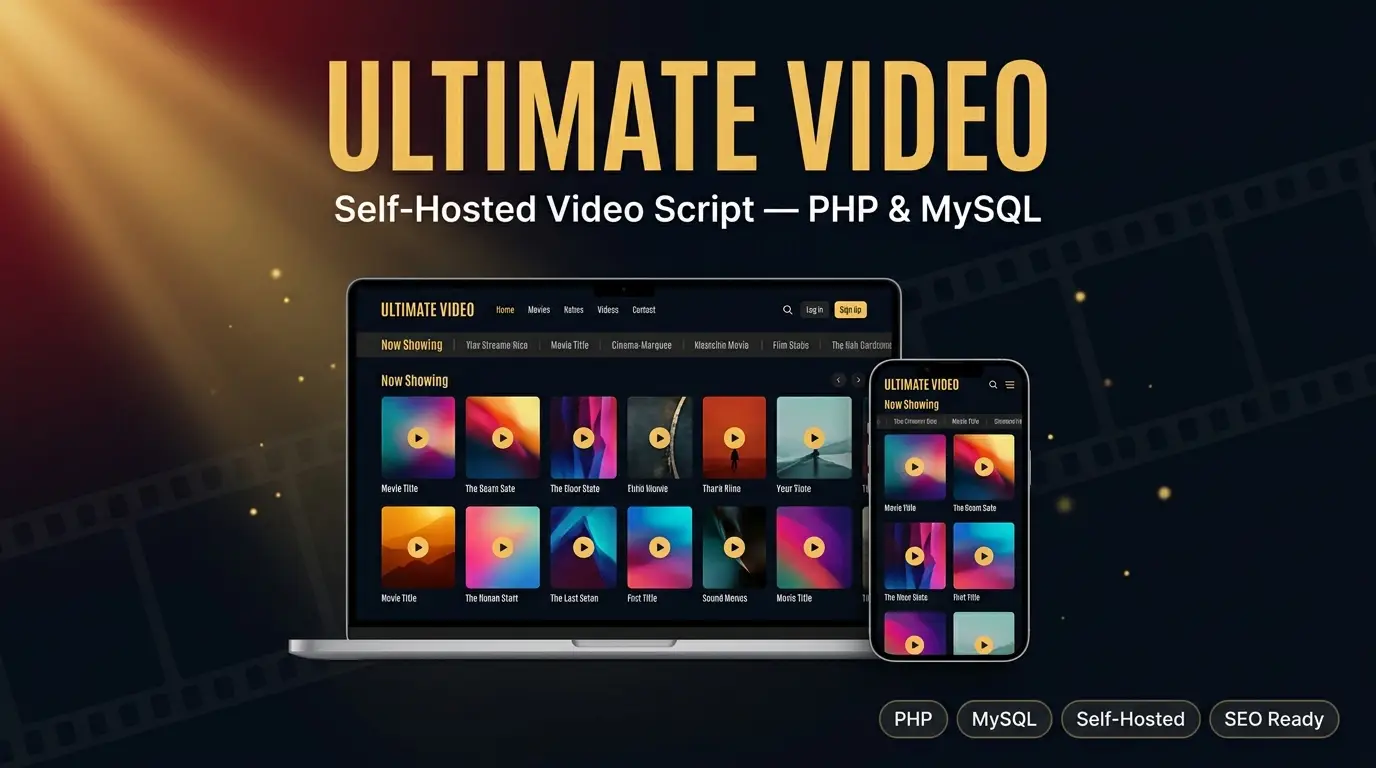

Description
Ultimate Video is a ready-made website script for running a video content site — for example a movie trailers and reviews site. You do not need to know how to code. Everything is controlled from a simple Admin Panel: adding videos, organizing categories, writing pages, changing the site's look, and setting up ads.
The script is self-hosted, which means it runs on your own hosting account (like Hostinger, any cPanel host, free hosting, or a VPS) instead of depending on a third-party platform. You own the code, the database, and all the content.
Features
Visitor-Facing Website
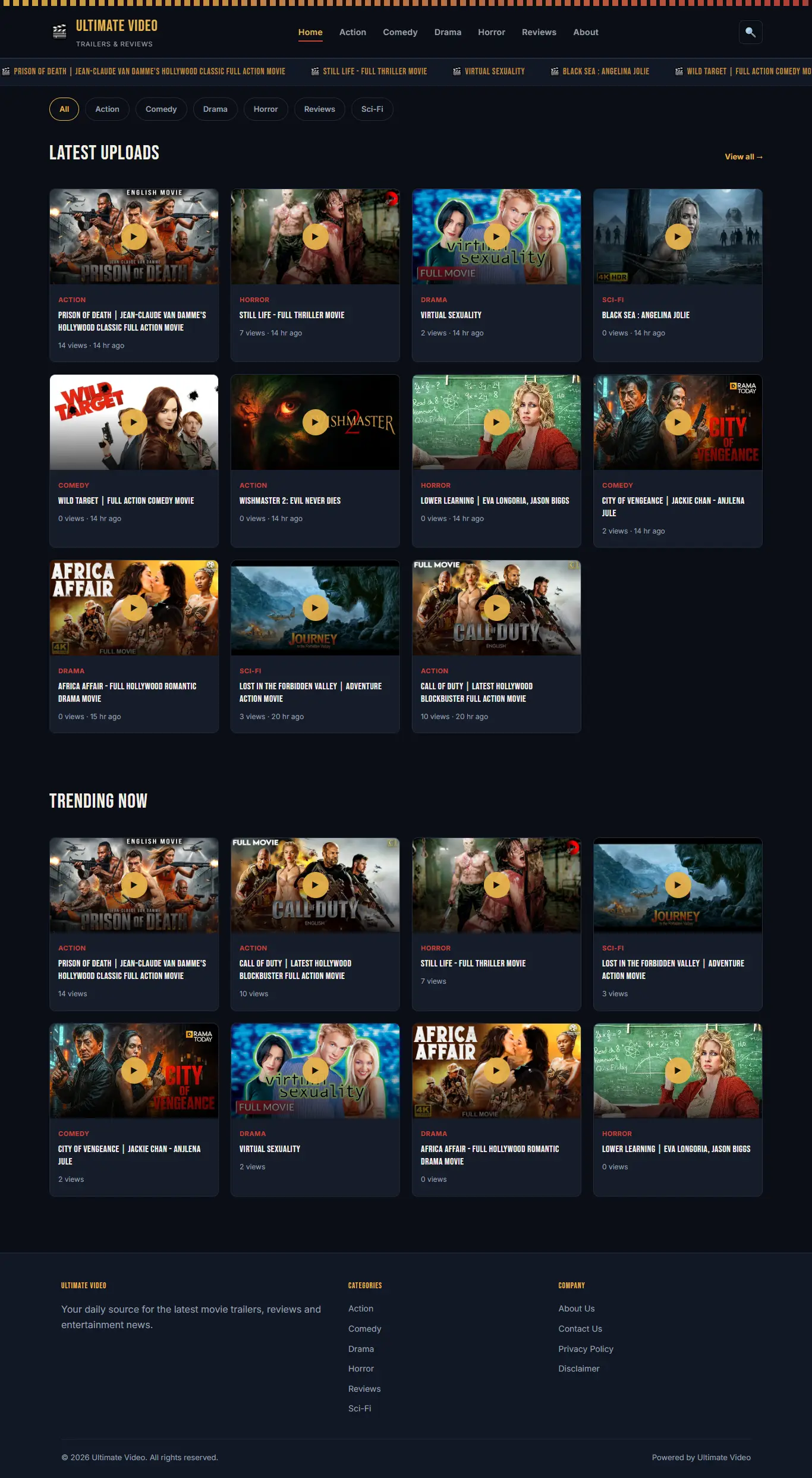
- Clean, dark "cinema" themed design that works on mobile, tablet, and desktop
- Hamburger menu navigation on mobile
- Homepage with latest uploads and trending videos
- Category browsing pages
- Search box
- Video pages support two video types: embedded links (like YouTube) and direct MP4 upload with a built-in player
- Random "Related Videos" section under every video (you choose how many are shown)
- Clean, short web addresses — for example yoursite.com/movie-name instead of a long link with symbols
- Category pages at yoursite.com/category/action
- Built-in About Us, Contact Us (with working contact form), Privacy Policy, and Disclaimer pages
- Custom 403 and 404 error pages that match your site's design
Social Sharing
- A "Share" button on every video page
- Opens a share panel with a copyable link box and one-click share buttons for WhatsApp, Telegram, X (Twitter), Facebook, LinkedIn, Reddit, VK, Pinterest, and Line
- Buttons automatically arrange into a neat 3-per-row grid on mobile phones
Admin Panel
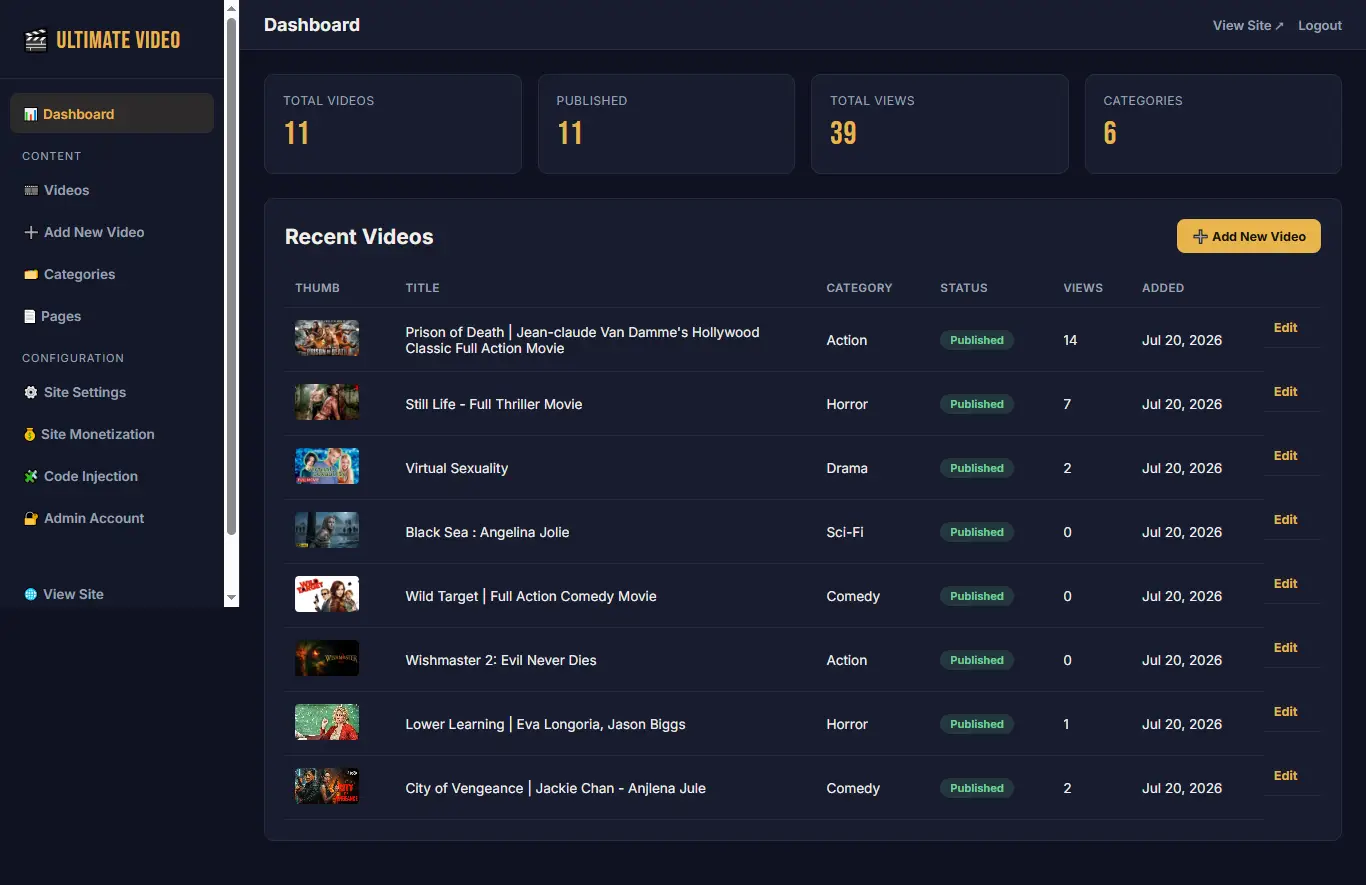
- Simple dashboard showing total videos, published videos, total views, and categories
- Add, edit, and delete videos — with a modern editor (see below)
- Add, edit, and delete categories
- Add, edit, and delete custom pages, plus edit the required About/Contact/Privacy/Disclaimer pages
- Change your login email and password at any time
- Change site name, tagline, logo, favicon, and website address — with the option to remove an uploaded logo/favicon
- Everything works on a mobile phone too — the admin panel is fully responsive
SEO Tools
- Editable meta title, meta description, and keywords for the whole site, and per video/page/category
- Canonical tags on every page
- Open Graph tags (for Facebook/WhatsApp link previews) and Twitter Card tags
- Schema.org structured data (WebSite and VideoObject) to help search engines understand your content
- Automatic, always up-to-date XML sitemaps, split for large sites: /sitemap.xml (index), /page-sitemap.xml, /category-sitemap.xml, and /post-sitemap1.xml, /post-sitemap2.xml, and so on automatically as your video count grows (200 videos per file)
Monetization
- A dedicated "Site Monetization" page in the admin panel
- Up to 3 ad code slots (2 required, 1 optional) — paste any ad network's code
- Ads automatically appear on the homepage and every video page — no template editing needed
Code Injection
- Paste your Google Analytics or tracking code once — it applies to every page automatically
- Custom "Header Code" box (goes inside the page's <head>)
- Custom "Footer Code" box (goes just before the page closes)
Performance and Caching
- Every page sends the correct cache headers, so browsers and hosting-level caches (like LiteSpeed Cache) always show your latest content — no stale pages after you publish something new
- Your website's CSS and JavaScript files automatically get a fresh version number whenever they're updated, so visitors' browsers download the newest version right away
Benefits
You Own Everything
No monthly platform fees, no third-party lock-in. The code, design, database, and every video run on your own hosting account.
Works on Cheap Hosting
Built to run comfortably on affordable shared hosting (like Hostinger) or even free hosting, as well as any VPS if you want more power later.
No Coding Needed Day-to-Day
Adding videos, pages, and categories, changing branding, and managing ads is all done through simple admin panel forms.
Search-Engine Friendly
Clean URLs, full meta tag control, structured data, and automatic sitemaps give your site a real chance to rank in Google.
Ready to Monetize
Drop in ad codes from any network in minutes — no need to touch a single template file.
Mobile Visitors Covered
Both the public website and the admin panel are fully usable from a phone, so you can manage your site from anywhere.
How to Use It
1- Logging In
Go to yoursite.com/admin/ and log in with the email and password you set during installation.
2- Adding a Category
- In the admin sidebar, click Categories.
- Fill in the category name (the web address slug is created automatically).
- Optionally add a description and SEO meta title/description for that category.
- Click Add Category.
3- Adding a Video
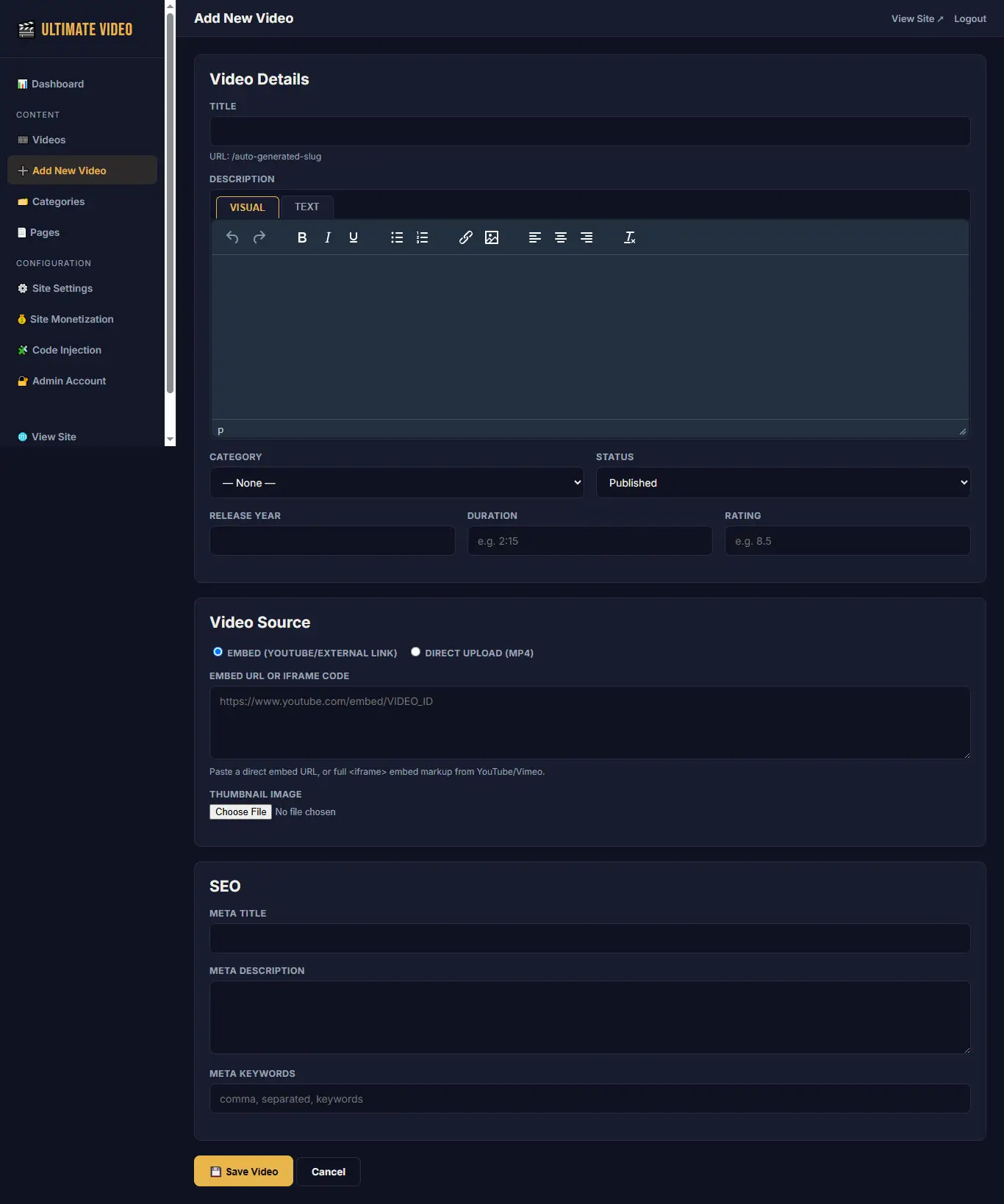
- Click Add New Video in the sidebar.
- Enter the title — the clean web address is generated automatically underneath the title box.
- Write the description using the Visual/Text editor (see the Editor section below).
- Choose a category and set the status to Published or Draft.
- Optionally fill in release year, duration, and rating.
- Under Video Source, choose either:
- Embed — paste a YouTube/Vimeo link or embed code, or
- Direct Upload — upload an MP4/WEBM/MOV file directly
- Upload a thumbnail image (optional but recommended).
- Fill in the SEO fields if you want a custom meta title/description for this video.
- Click Save Video.
4- Adding a Custom Page
Go to Pages → Add Custom Page. This works the same way as adding a video, but for standalone pages like "Terms of Service" or "DMCA". The required system pages (About Us, Contact Us, Privacy Policy, Disclaimer) already exist after installation — you can edit their content any time from the same Pages screen, but they can't be deleted.
5- Site Settings, Monetization, and Code Injection
ScreenWhat you can change thereSite SettingsSite name, tagline, website address, logo, favicon, SEO defaults, contact email, footer text, and how many related videos to showSite MonetizationUp to 3 ad code slots shown on the homepage and video pagesCode InjectionAnalytics code, custom header code, custom footer code — applied site-wideAdmin AccountChange your login email and password
6- The Editor
Both "Add New Video" and "Add Custom Page" use a WordPress-style editor with two tabs:
- Visual — a normal formatting toolbar (bold, italic, lists, links, images, alignment) — you type and format like in a word processor, no HTML knowledge required.
- Text — shows the raw HTML source, for advanced users who want full control over the markup (for example, pasting a custom embed snippet).
Switching between the two tabs keeps your content in sync both ways.
7- Social Sharing
Every video page has a Share button under the title. Clicking it opens a panel with a copyable link and one-click buttons for WhatsApp, Telegram, X, Facebook, LinkedIn, Reddit, VK, and Pinterest — no setup required, it works automatically for every video.
8- SEO Tools
Fill in the meta title/description/keywords fields wherever you see them (Site Settings for site-wide defaults, or per video/category/page for specific content). Your sitemaps update automatically — just submit yoursite.com/sitemap.xml once in Google Search Console and it will always reflect your latest content.
 ShortMyLink + WP Safelink Bundle - PHP URL Shortener & Monetization Script
 WP Safelink - WordPress Multi-Step Safelink Plugin for ShortMyLink
 Popunder Smart Rotator - Stealth Ad Script for Website Monetization
 Ultimate Video - Fully Functioning PHP Video & Movie Script
 ShortMyLink - Self-Hosted PHP URL Shortener & Ad Monetization Script